
How to Store Recipes on iPhone: Notes, Photos or an App
The short answer
You can store recipes on an iPhone in three places it already has: the Notes app, a Photos album of screenshots, or a Safari bookmarks folder. All three are free. They work for a handful of recipes and get hard to manage once you have dozens.
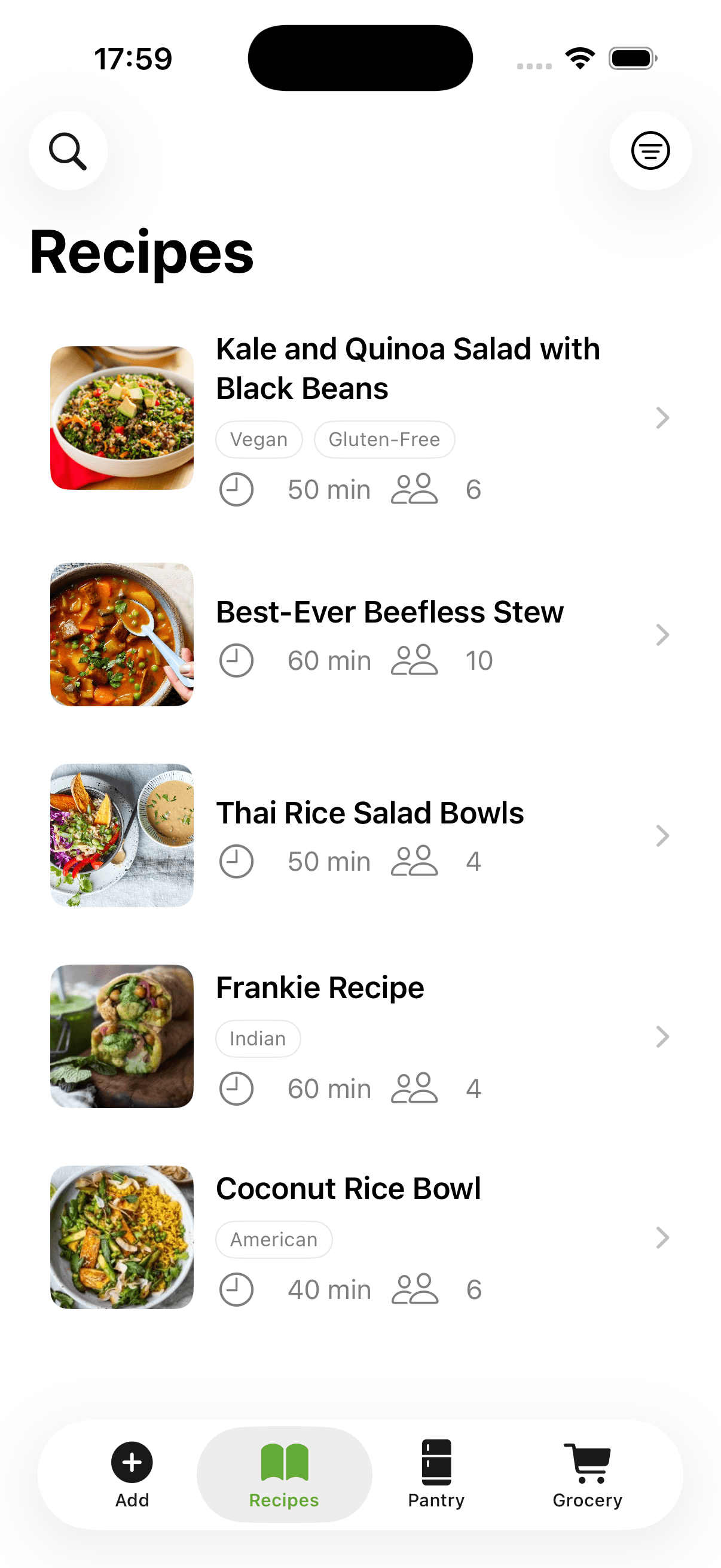
Past that point a recipe app is the better home. CookFlic saves a recipe from a link, a video or a photo of a cookbook page as ingredients and steps, keeps it on your phone for offline cooking and syncs it to your account. The free plan holds 25 recipes.
Four ways to store recipes on iPhone, compared
What each option is good for and where it stops working.
| Where | Cost | Good for | Where it falls short |
|---|---|---|---|
| Notes app | Free | Recipes you type or paste, a few scanned pages | No servings to scale, no shopping list, no structure beyond folders |
| Photos album | Free | Screenshots from videos, photos of cookbook pages | A picture of a recipe. Nothing to scale or shop from, and it gets buried in the camera roll |
| Safari bookmarks | Free | Recipes on websites you trust to stay online | Saves the address, not the recipe. Needs a connection, and the page can change or disappear |
| Recipe app (CookFlic) | Free up to 25 recipes | Links, videos, cookbook pages and handwritten cards in one library | One more app to install. AI imports are limited to 3 a week on the free plan |
Store recipes in the Notes app
Notes is the quickest free option, and it is already on your phone.
1. Open Notes and make a folder called Recipes.
2. Give each recipe its own note, with the dish name on the first line so it is easy to spot in the list.
3. Paste the text you copied from a website or a video caption, or type the recipe in.
4. For a cookbook page or a recipe card, use the document scanner built into Notes.
This holds up for ten or twenty recipes. The limits show when you cook from it: a note has no servings to scale and no shopping list. A scanned page stays a picture of the page. You can read it, but you can't change the servings or send the ingredients to a list.
Keep screenshots and photos in a Recipes album
Screenshots are how a lot of recipes get saved: the ingredient list from a reel, a page from a friend's cookbook, a recipe someone texted you.
To keep them from sinking into the camera roll, make an album called Recipes in Photos and add each screenshot right after you take it. Crop it so the ingredients fill the screen.
It is fast and free. It is also the hardest option to cook from. Fifty screenshots look alike in a grid, and one recipe is often spread over three or four images.
Save recipes from websites as Safari bookmarks
For a recipe on a website, tap Share in Safari, add a bookmark and file it in a folder called Recipes.
A bookmark stores the address, not the recipe. You need a connection to open it, you scroll past the same ads and story every time, and if the site removes the page or puts it behind a login, the recipe goes with it. For anything you cook often, copy the text into Notes or import the link into a recipe app.
Store them in a recipe app
A recipe app stores the recipe itself: a title, ingredients with amounts, numbered steps and a photo. That is what lets it scale servings, search by ingredient and build a shopping list. With CookFlic on iPhone it works like this:
1. From a website: tap Share in Safari and choose CookFlic, or copy the link, tap the + button in CookFlic and paste it. Pages that carry standard recipe data import free.
2. From TikTok, YouTube or Instagram: tap Share on the video and choose CookFlic. It reads the caption, and the video itself when the recipe is only spoken.
3. From a cookbook or a handwritten card: tap the + button, choose "Snap a page" and photograph it. CookFlic turns the photo into ingredients and steps you can edit.
4. Sort recipes into cookbooks such as "Weeknight" or "Family recipes".
Video and photo imports use AI. The free plan includes 3 of those a week and holds 25 recipes, with no ads. Lifetime, $79.99 once, or a subscription removes the recipe limit.
Will your recipes survive a new iPhone?
Check this before you trade in the old phone.
Notes, photos and Safari bookmarks move to a new iPhone only if they sync with iCloud or are part of the backup you restore. Open Settings, tap your name and look at what iCloud is syncing before you erase anything.
CookFlic keeps every recipe on the phone and syncs it to your account, so a new iPhone means signing in with Apple or Google. Recipes you delete sit in Trash for 30 days, which covers the accidental swipe. The same library also opens on iPad, Mac and Android.
Which one should you use?
Under twenty recipes that you mostly type or paste: Notes is enough.
Mostly screenshots from videos: an album works for a while, but plan to move the keepers somewhere that holds text.
More than that, or recipes coming from websites, videos and cookbooks at once: use a recipe app, and move over only the recipes you cooked in the last year. Our guide to organizing recipes on iPhone covers tagging and keeping the library tidy.
Ready to cook with what you have?
CookFlic captures recipes from anywhere, matches them to your pantry, and guides you step-by-step. See all features →
DownloadFrequently Asked Questions
How do I store recipes on my iPhone?
For a few recipes, keep each one as a note in a Recipes folder in the Notes app. For a larger collection, use a recipe app: share links and videos to it from Safari or TikTok and photograph cookbook pages, so everything sits in one searchable library.
How do I save recipes on iPhone for free?
Notes, a Photos album and Safari bookmarks are all free. CookFlic's free plan stores 25 recipes with no ads, with free imports from websites that carry standard recipe data and 3 AI imports a week for videos and photos.
Is the Notes app good for recipes?
For a small collection, yes. It is free and simple. It has no servings scaling and no shopping list, so it gets slow to cook and shop from as the collection grows.
Can I open my saved recipes without internet?
Bookmarks need a connection. A recipe app that keeps recipes on the device works offline. CookFlic stores your library on the phone, so you can browse and cook without a connection. Only AI imports need the internet.
Do my recipes move to a new iPhone?
Notes, photos and bookmarks do if they sync with iCloud or are in the backup you restore. In CookFlic, sign in on the new phone and the library is there.
Related articles
8 min read
How to Save, Scan, and Organize Recipes on iPhone
Save recipes from Safari, TikTok, and YouTube, scan cookbook pages with the camera, and store everything in one searchable library on your iPhone. A setup that sticks.
6 min read
How to Import Recipes From Any Website, Video, or Cookbook
Stop saving recipes in five different places and never finding them again. Here is how to import recipes from any source — URLs, YouTube videos, cookbooks, and apps — into one searchable library on your iPhone.
6 min read
How to Digitize Handwritten Recipe Cards and Old Cookbooks
A practical way to scan family recipe cards and cookbook pages into a recipe app you can search, scale and share, without retyping everything.